Hello Wordl App & Mobile Guide: Play Free Without Downloads
There is no official Hello Wordl app in the Apple App Store or Google Play Store—any similarly named download in app stores is an unrelated third-party game. Instead, you can play the Hello Wordl game free inside Safari, Chrome, Firefox, or Edge at hellowordl.org and add it to your iPhone or Android home screen in three taps for a full-screen 4 to 11 letter experience without downloads or invasive permissions.
Why Browser Play Beats Lookalike Phone Apps
Because Hello Wordl was built as an open web puzzle rather than a paid app-store release, searching for a "hello wordl app" in mobile app stores often turns up copycat games filled with banner pop-ups, locked word lengths, or unnecessary device permissions. Playing directly in your browser keeps every round fast, clean, and private:
- Genuine 4 to 11 letter slider: Pick quick 4-letter sprints, standard 5-letter sessions, or challenging 9–11 letter rounds without separate apps.
- Instant Unlimited + Daily Seed switching: Practice endlessly on random boards or click Today's (or open Hello Wordl Daily Seed Mode) to share a date-locked run with friends.
- No account or email registration: Your streak counter, preferred difficulty tier, and keyboard layout persist cleanly using browser storage and an anonymous session cookie.
How to Pin the Hello Wordl Web App to Your Phone Home Screen
If you want one-tap full-screen launches that feel just like a native phone app—without trusting third-party downloads—pin hellowordl.org straight to your phone's home screen:
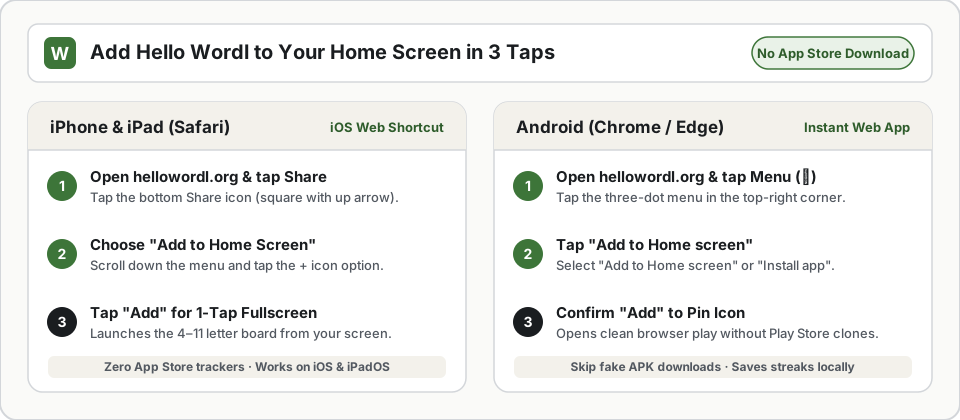
- iPhone or iPad (Safari): Open
hellowordl.org, tap the bottom Share square-and-arrow icon, scroll down, and tap Add to Home Screen. Naming the shortcutHello Wordlplaces the greenWtile icon right beside your daily tools. - Android (Chrome or Edge): Open
hellowordl.org, tap the ⋮ browser menu in the upper-right corner, and choose Add to Home screen or Install app.
Mobile Touch Tips for 4 to 11 Letters
Touchscreen typing feels completely different from tapping a desktop keyboard, especially once you raise the letter slider above 7 tiles per row. Three built-in layout features keep Hello Wordl comfortable even on narrow phone screens down to 320px wide:
- One-Tap Fullscreen Mode: Tap Fullscreen directly beneath the stage whenever your browser address bar crowds the bottom keyboard row. Locking fullscreen prevents stray page scrolling while tapping
EnterorBackspace. - Fluid 4–11 Tile Grids: When switching up to 9, 10, or 11 letters, each row automatically shrinks tile widths proportionally so all letters remain legible without horizontal panning.
- Left-Handed Enter Toggle: Open ⚙️ Settings and enable "Enter" on left side if your thumb habitually bumps
Enterwhile reaching for edge keys, or if you hold your phone primarily in your left hand.
Playing on Chromebooks, Windows PCs, and MacBooks
On laptops and desktop computers, Hello Wordl responds natively to physical keyboards the instant the board opens:
- Type any letters
A–Zto fill the current guess row automatically. - Press
Backspaceto erase typos smoothly without navigating back a page. - Press
Enterto submit a finished word and reveal green, yellow, and gray tile clues. - Press
Enteronce more after winning, running out of tries, or clicking Give up to launch your next round immediately.
If you type on Dvorak, Colemak, AZERTY, or QWERTZ, match your on-screen reference inside ⚙️ Settings as explained in our Hello Wordl Keyboard Guide.
Solving Common Browser & Input Hiccups
Hello Wordl is intentionally lightweight, yet school Chromebooks, strict browser extensions, or slow cellular networks can occasionally cause minor hiccups:
- "Word not accepted" during the first second: Full validation checks against our 182,721-word dictionary as it finishes loading right after starter words. If you type an uncommon 8-letter word on a slow mobile connection before the word list finishes loading, wait one second and press
Enteragain—the status banner reminds you clearly instead of costing a guess. - Physical keyboard stopped typing: Clicking a button outside the game frame shifts browser focus back to the surrounding article. Click anywhere inside the Hello Wordl tile grid or press any virtual key once to return keyboard focus smoothly.
- Difficulty color confusion: Players with red-green color vision deficiency can open ⚙️ Settings and toggle High-Contrast Colorblind Mode, switching exact hits to vibrant Orange and misplaced hits to crisp Blue (including shared Emoji Grids).
Saving Streaks, Sharing Results & Quick Strategy Links
When you play Hello Wordl online at hellowordl.org, your browser automatically saves finished games, win rates, active streaks, best win streaks, dark-theme choice, and keyboard settings locally while syncing streak milestones anonymously to the built-in Hello Wordl leaderboard (📊 Stats). When a puzzle wraps up, hit Copy Emoji Grid to share spoiler-free 🟩🟨⬛ squares or click Share Challenge to let a friend try that exact same word.
Once your phone or desktop setup feels comfortable, test yourself on longer vocabulary or sharpen move-one habits with our Hello Wordl Gameplay Guide and Best Starting Words for 4 to 11 Letters.